Addresses
The Addresses section has two subsections:
- One-time addresses — create and manage addresses for receiving payments;
- Residual balance scan — find "stuck" funds on one-time addresses (see the dedicated section).
One-time addresses
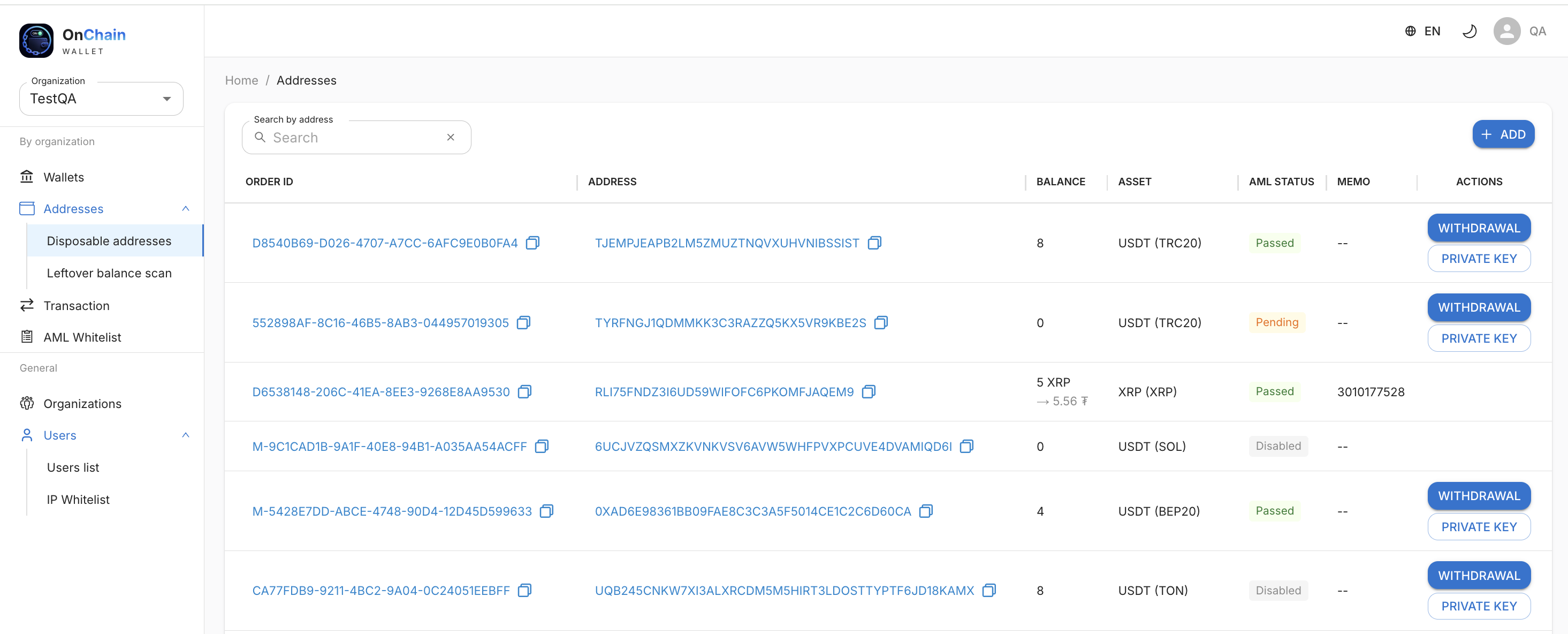
A separate address is created for each order.
Create an address
- Click + ADD.
- Select token and network.
The system shows only tokens and networks that are already configured for you. If nothing is configured (0 configurations), the list will be empty — first configure the required network or Coins in the organization tabs.
How funds are received
- Coins address — receives funds directly to the Coins wallet with conversion to USDT.
- Configurable network address (TRC20/BEP20/ERC20/TON/Arbitrum) — receives payment
on a one-time address, then funds are automatically sent to the main balance if the
AML level does not exceed the threshold set in network settings. When
payout_token_tickeris omitted, hot-wallet stables stay on-chain, and an auto-payout of those stables is made from the hot wallet.
A direction where the deposit and the payout both use the Coins balance is described in Crypto to crypto.
Payments from addresses on the AML whitelist pass without AML screening.
What is shown for each address
- Order ID — order/address identifier;
- Address — the cryptocurrency address (can be copied);
- Balance — amount received. For Coins, conversion is also shown — e.g.
5 XRP → 5.56 ₮(USDT equivalent after conversion via the hub); - Asset — token and network;
- AML — screening result indicator (see AML statuses);
- Memo — if required for the network;
- Actions — WITHDRAWAL and PRIVATE KEY.
AML statuses
For each incoming deposit on a configurable network address, AML screening may run. The result is shown in the AML column and determines whether funds are automatically credited to the main balance.
| Status | Meaning | What the UI shows |
|---|---|---|
| Disabled | AML screening is not enabled for this organization network. | "Disabled" in gray. Funds are collected without screening. |
| Pending | Address created, awaiting credit. | "Pending" in orange. Usually updates within 1–5 min. |
| Passed | AML screening passed. | "Passed" in green. Balance is collected to the main wallet. |
| Failed | Risk level is above the limit set in network settings. | "Failed" in red. Balance remains on the one-time address — manual action required. |
| Provider error | Technical error during screening (timeout, invalid provider response, etc.). | "Provider error" in orange with a tooltip. Contact support if needed. |
Info
The acceptable risk threshold is set in the organization network settings (Organizations → Networks). If AML is disabled for a network, all deposits are credited without screening.
Manual actions on an address
In most cases everything happens automatically. Manual actions are needed in non-standard situations — for example, if AML was high or there was a duplicate (double) credit to the same one-time address. Then you can:
- WITHDRAWAL — manually withdraw funds from the one-time address to an address you specify (e.g. refund the client or send to your own wallet) without "contaminating" the main wallet.
- PRIVATE KEY — view the one-time address private key to manually control funds outside the standard automatic transfer. This is an emergency/manual tool to recover access to funds on a specific one-time address.
Info
Manual withdrawal and private key access are available for one-time addresses of configurable networks. They do not apply to Coins addresses — there, reception goes directly to the Coins wallet.
Warning
Warning: Never share private keys. Store them securely and limit access to authorized personnel only.