Residual balance scan
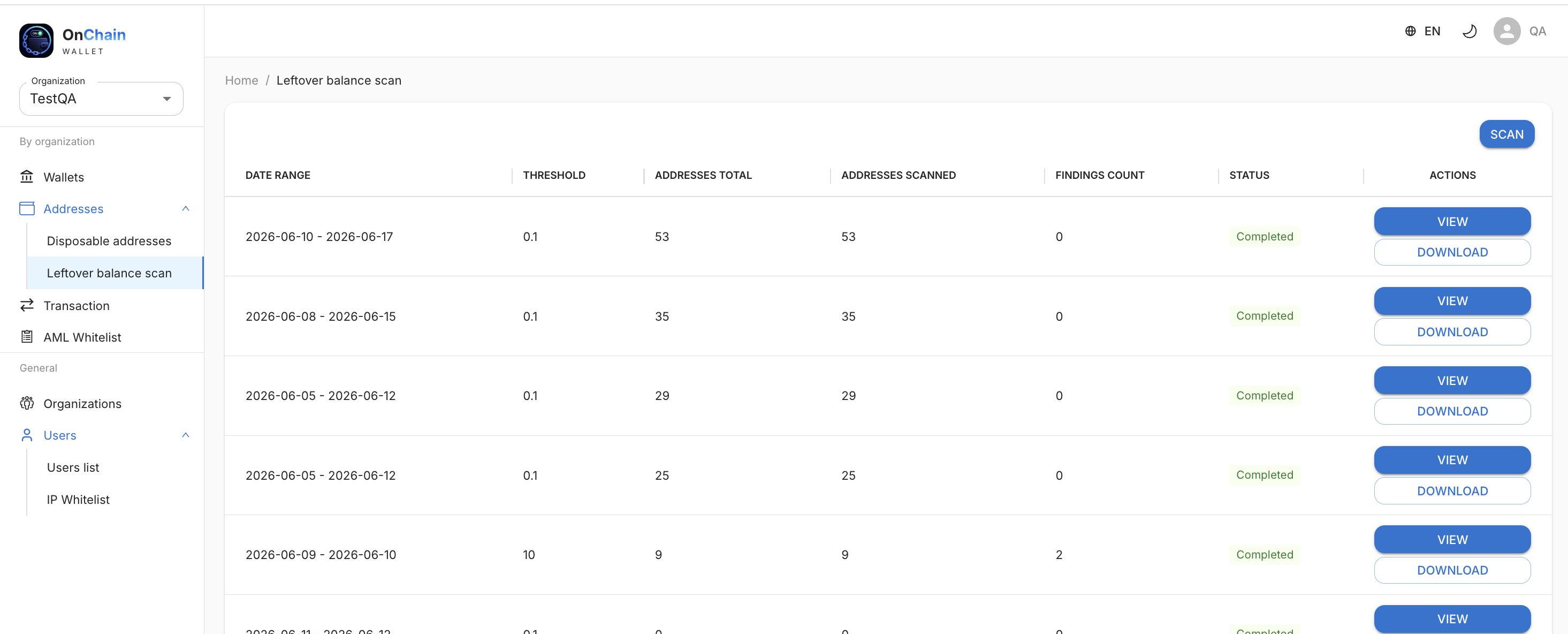
The Residual balance scan section (under Addresses in the menu) lets you check one-time addresses over a selected period and find those where funds remain — for example, after a failed AML check, technical error, or duplicate credit.
Run a scan
- Go to Addresses → Leftover balance scan.
- Click SCAN.
- Set parameters:
- Threshold — minimum remaining balance to include (e.g.
0.1). Addresses with balance below the threshold are excluded from results. - Period — date range for checking one-time addresses. Quick buttons 7 days and 30 days are available, or choose from date and to date manually.
- Click SCAN to start or Cancel to return to the list.
The scan runs in the background. When complete, a record appears in the history table.
Scan results
The table shows all scans that were run:
| Column | Description |
|---|---|
| Date range | Range covered by the scan. |
| Threshold | Minimum amount set when starting. |
| Addresses total | Number of one-time addresses in the period. |
| Addresses scanned | How many addresses have been checked. |
| Findings count | How many addresses have a balance above the threshold. |
| Status | E.g. Completed (green) — scan finished. |
| Actions | VIEW — open results in the browser; DOWNLOAD — get a file with addresses and balances. |
Info
Scanning is useful for regular audits: if "stuck" funds accumulated on one-time addresses, you can find them quickly and withdraw manually via One-time addresses.