Organizations
An organization is a separate project/site with its own wallets, networks, and settings. Each organization has a unique identifier (organization ID) shown on its card.
Create an organization
- Go to Organizations.
- Click + ADD and set a name.
To open settings — click the organization card. Inside you will find tabs: General, Networks, AML, Coins, API keys.
Info
Most sensitive fields (keys, wallet private keys) are hidden by default — shown as asterisks. To set or change a value, click EDIT next to the field.
General
On the General tab you configure basic organization parameters:
- Name — display name of the organization (up to 64 characters).
- Webhook URL — address where the platform sends event notifications (e.g. successful or rejected payments). Enter the URL where your site/service receives notifications.
Networks
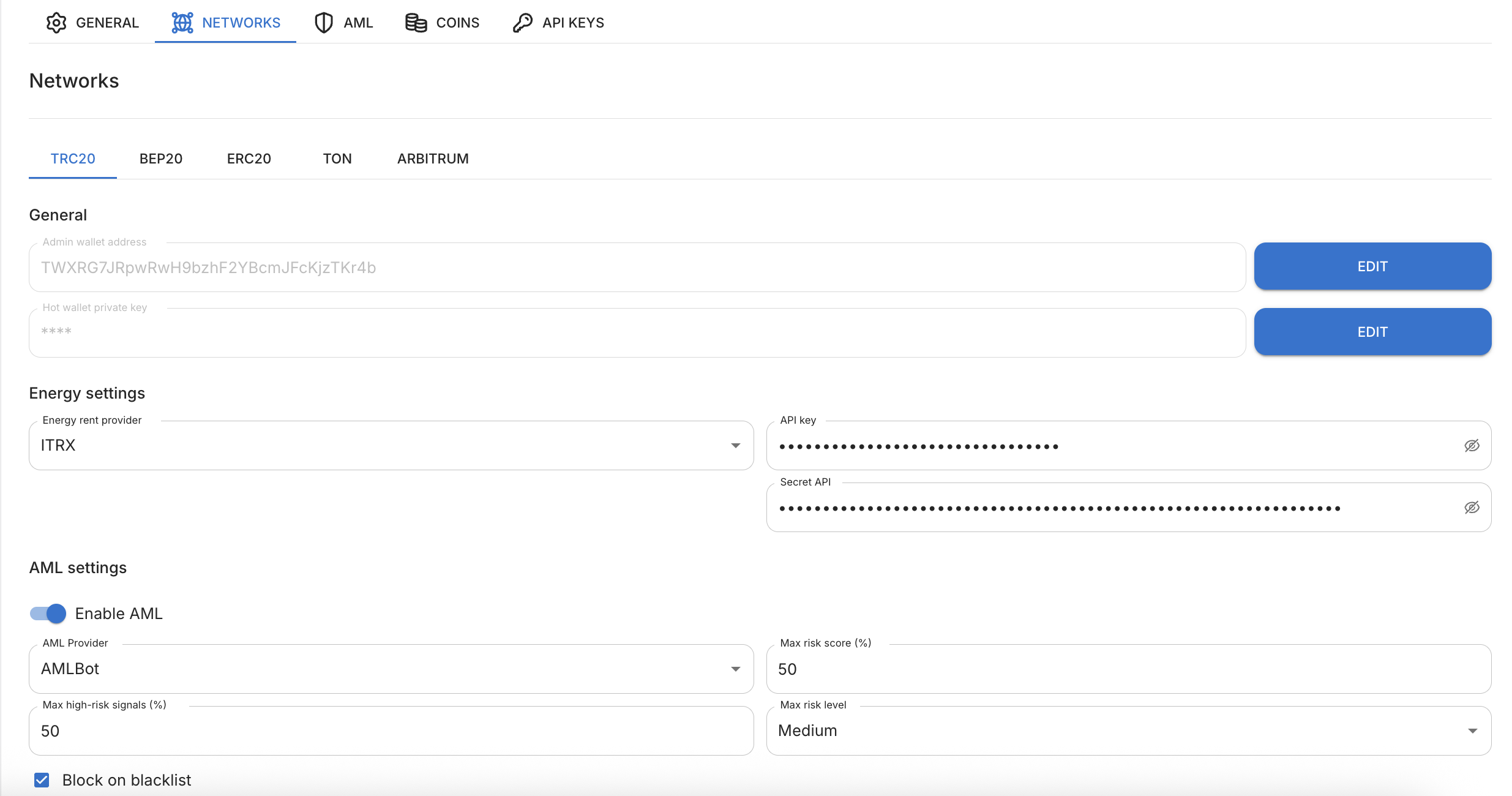
On the Networks tab you configure each blockchain network where you want to accept payments. Networks are separate tabs: TRC20, BEP20, ERC20, TON, ARBITRUM.
Each network has configuration blocks. The set of fields depends on the network — for example, the Energy settings block exists only for TRC20.
General block (network wallets)
- Admin wallet address — your permanent (main) address in this network. The platform transfers funds here after a successful AML check, and you withdraw to an exchange or external wallet from here.
- Hot wallet private key — configures the "hot" wallet. It is needed so each payment is first received on a separate one-time address and, after AML check, automatically transferred to the main wallet. You set all keys yourself.
Info
For security, the hot wallet private key is shown masked (asterisks) after saving. To replace it, click EDIT and enter a new one.
Energy settings block (TRC20)
Transfers on the Tron network require energy. Two energy rental providers are available — choose one:
- Netts
- ITRX
For the selected provider, specify:
- API key;
- Secret API.
AML settings block (for this network)
- Enable AML — toggle for screening incoming payments in this network.
- AML provider — AML screening provider: BitOK or AMLBot (depends on the network).
- Max risk score (%) — upper limit for overall risk (for TRC20 and similar networks).
- Max high-risk signals (%) — upper limit for high-risk signal count.
- Max AML risk level — threshold below which a payment is acceptable. Available levels: low, medium, high, critical.
- Block on blacklist — if enabled, a payment from a blacklisted address is blocked regardless of other indicators.
If the payment risk level does not exceed the chosen threshold, funds are automatically transferred to the main wallet. If it exceeds — funds remain on the one-time address for manual handling.
Warning
None of the AML screening providers currently support screening for the TON network.
For the BitOK provider the AML field set is simplified — only the AML toggle, provider, and max risk level are available.
Info
The stricter the threshold (e.g. "low"), the fewer "risky" payments pass automatically. Addresses from the AML whitelist skip screening.
AML
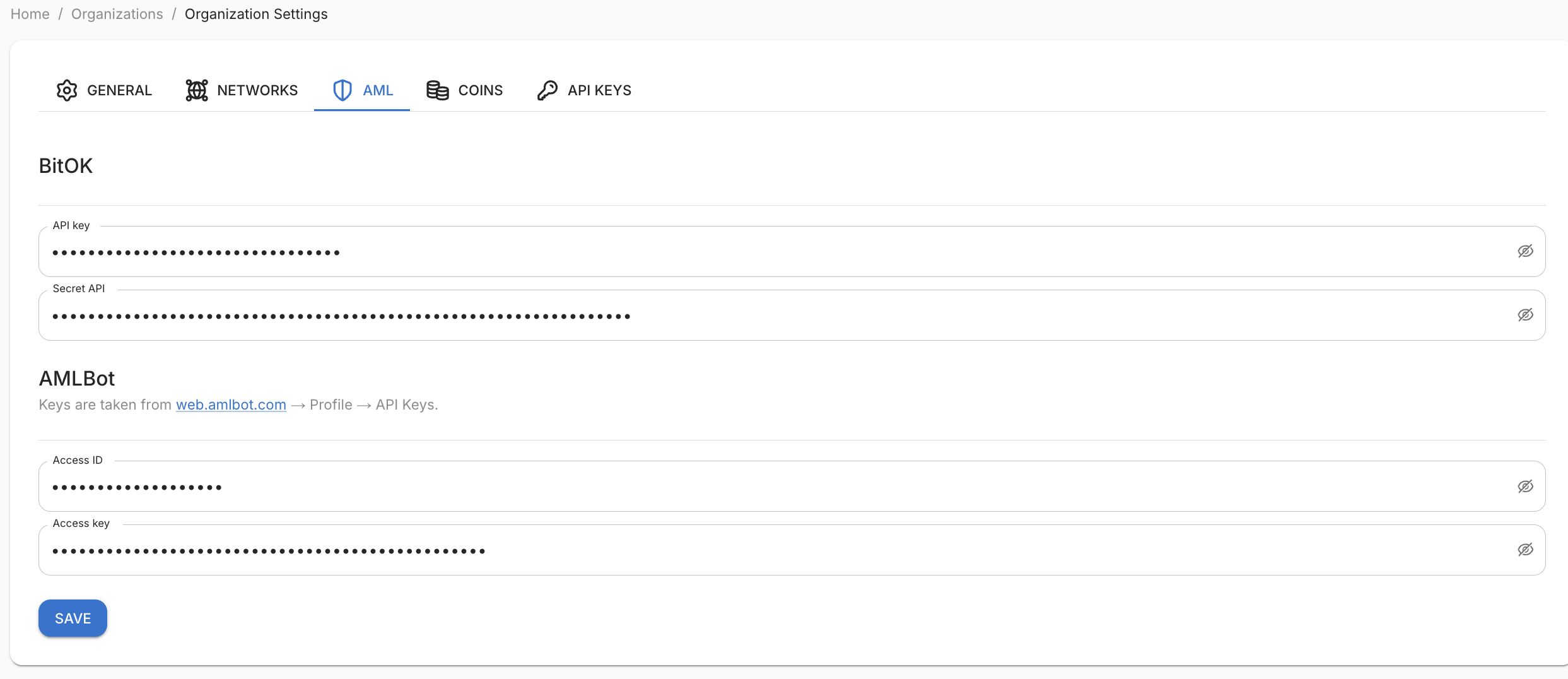
On the AML tab you enter AML provider credentials at the organization level. The platform supports two providers — keys for each are set separately:
BitOK:
- API key;
- Secret API.
AMLBot:
- Access ID;
- Access key.
AMLBot keys are obtained at web.amlbot.com → Profile → API keys.
The platform uses these keys to send incoming payments for screening to the provider chosen in each network's settings.
Coins
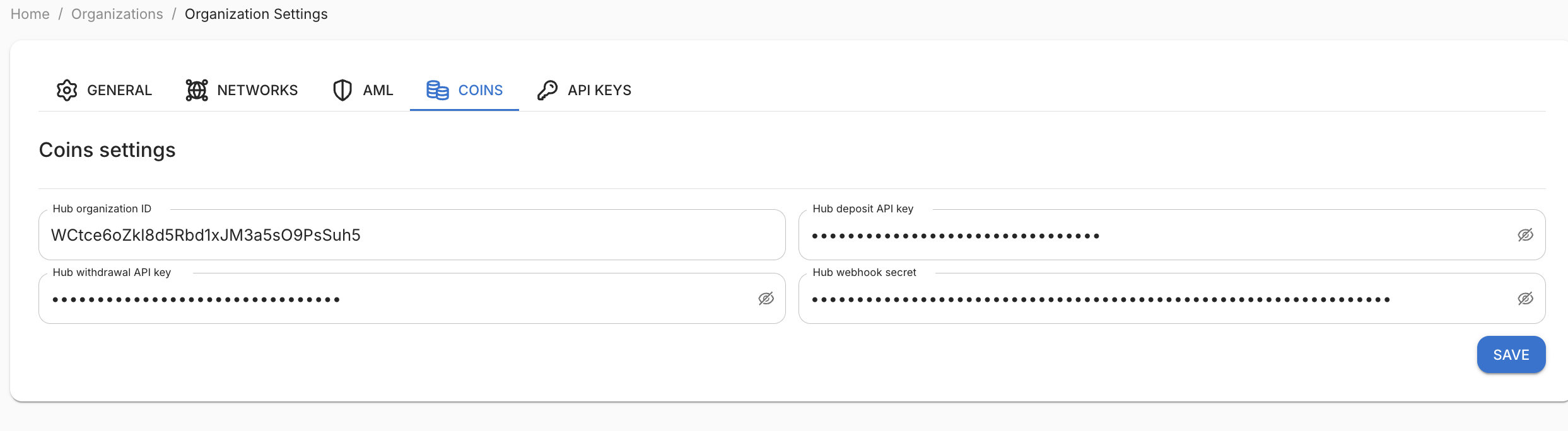
Coins is a hub integration that provides a single wallet for receiving and withdrawing funds across networks and volatile coins. Clients create their organization in the hub and receive keys that you enter here:
- Hub organization ID;
- Hub deposit API key;
- Hub withdrawal API key;
- Hub webhook secret.
Fill in all four fields — they work together. After saving, the Coins wallet becomes available for the organization.
Info
Fee. When funds are credited via Coins, a fee of 0.2% of the amount, but not less than 0.5 USDT is charged.
When funds arrive via Coins, the Addresses section shows
conversion in the Balance column — e.g. 5 XRP → 5.56 ₮.
API keys
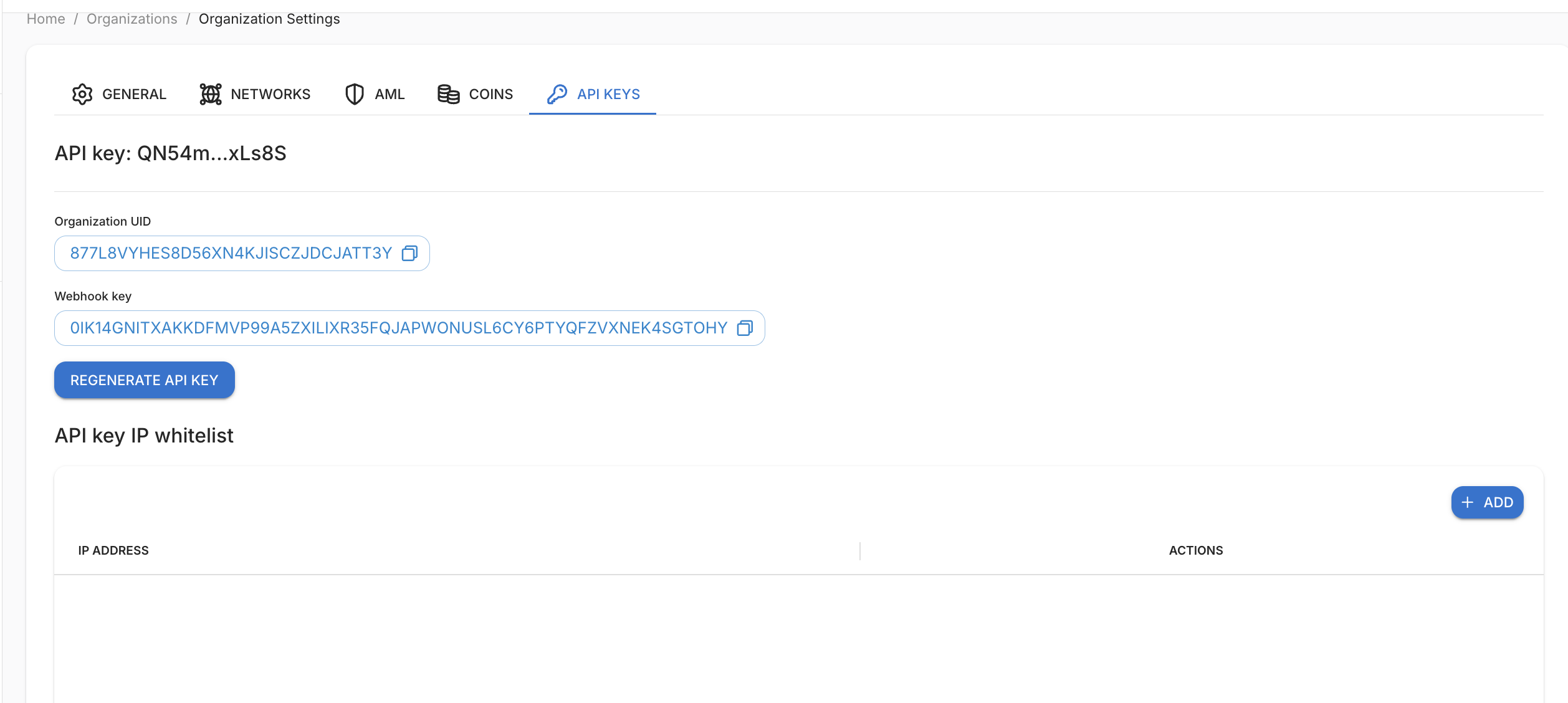
The API keys tab is needed to integrate payment acceptance into your site or service. Here you see:
- Organization UID — unique identifier of your organization;
- Webhook key — used to verify authenticity of notifications the platform sends to your webhook URL;
- API key — secret key for API requests; you can regenerate it
Warning
Important about regeneration. The new API key is shown once immediately after generation — copy and save it. The old key stops working, so update it in all integrations.
If 2FA (TOTP) is enabled in your profile, regenerating the API key will require a one-time code from your authenticator app.
API key IP whitelist
At the bottom of the tab — API key IP whitelist:
- if the list is empty — the API is available from any IP address;
- if one or more IPs are added — API requests are accepted only from those addresses.
Click + ADD to enter the IP address of the server running your integration.
Why this matters. With these credentials your external system can automatically:
- generate one-time addresses for each client order;
- request balance;
- initiate withdrawals and check their status.
You either embed payment acceptance in your own site/exchange or provide these keys to a third-party service (e.g. a crypto exchange module) that works with the platform on your behalf.
Deposit for a later coin payout
POST /generate-disposable-address accepts an optional payout_token_ticker: the ticker
of the coin you will pay out from this deposit.
- Omitted or blank: the address stays ordinary.
main_address_typedefaults toMAIN. Hot-wallet stables stay on-chain: USDT and USDC on TRC20, BEP20, and ARBITRUM; USDT, USDC, DAI, USDS, and PYUSD on ERC20; USDT on TON. - Present, but the ticker is not among known coins on any network: the field is ignored and the address stays ordinary. No token row is created. The same applies to fiat, for example UAH.
- A known ticker creates the address as Coins, even when
main_address_typeis omitted orMAIN. The deposit is credited to the virtual USDT balance so the later payout can spend it.
The payout from this deposit sends source_order_id equal to the deposit address
order_id. A hot-wallet stable is then also taken from the virtual USDT balance.
The withdrawal body does not need type=COINS: Coins is chosen when source_order_id
is present or the payout ticker is not one of the hot-wallet stables above.
A repeat request for the same address with a different payout_token_ticker and the
same order_id conflicts.